110 lines
4.1 KiB
Markdown
110 lines
4.1 KiB
Markdown

|
:::{note}
|
||
|
|
**AI Translation Notice**
|
||
|
|
|
||
|
|
This document was automatically translated by `Qwen/Qwen3-8B` model, for reference only.
|
||
|
|
|
||
|
|
- Source document: kernel/debug/profiling-kernel-with-dadk.md
|
||
|
|
|
||
|
|
- Translation time: 2025-05-19 01:41:49
|
||
|
|
|
||
|
|
- Translation model: `Qwen/Qwen3-8B`
|
||
|
|
|
||
|
|
Please report issues via [Community Channel](https://github.com/DragonOS-Community/DragonOS/issues)
|
||
|
|
|
||
|
|
:::
|
||
|
|
|
||
|
|
# Performance Analysis of the Kernel Using DADK
|
||
|
|
|
||
|
|
## 1. Overview
|
||
|
|
|
||
|
|
This document will teach you how to use DADK to perform performance analysis on the DragonOS kernel, in order to identify and resolve potential performance bottlenecks.
|
||
|
|
|
||
|
|
### 1.1 Preparation
|
||
|
|
|
||
|
|
::: {note}
|
||
|
|
Before you start, please ensure that you have installed DADK and have set up the compilation environment for the DragonOS kernel.
|
||
|
|
:::
|
||
|
|
|
||
|
|
### 1.2 What is a Flame Graph?
|
||
|
|
|
||
|
|
If you haven't heard of flame graphs before, you can read this article: [How to Read Flame Graphs? - Ruanyifeng](https://www.ruanyifeng.com/blog/2017/09/flame-graph.html)
|
||
|
|
|
||
|
|
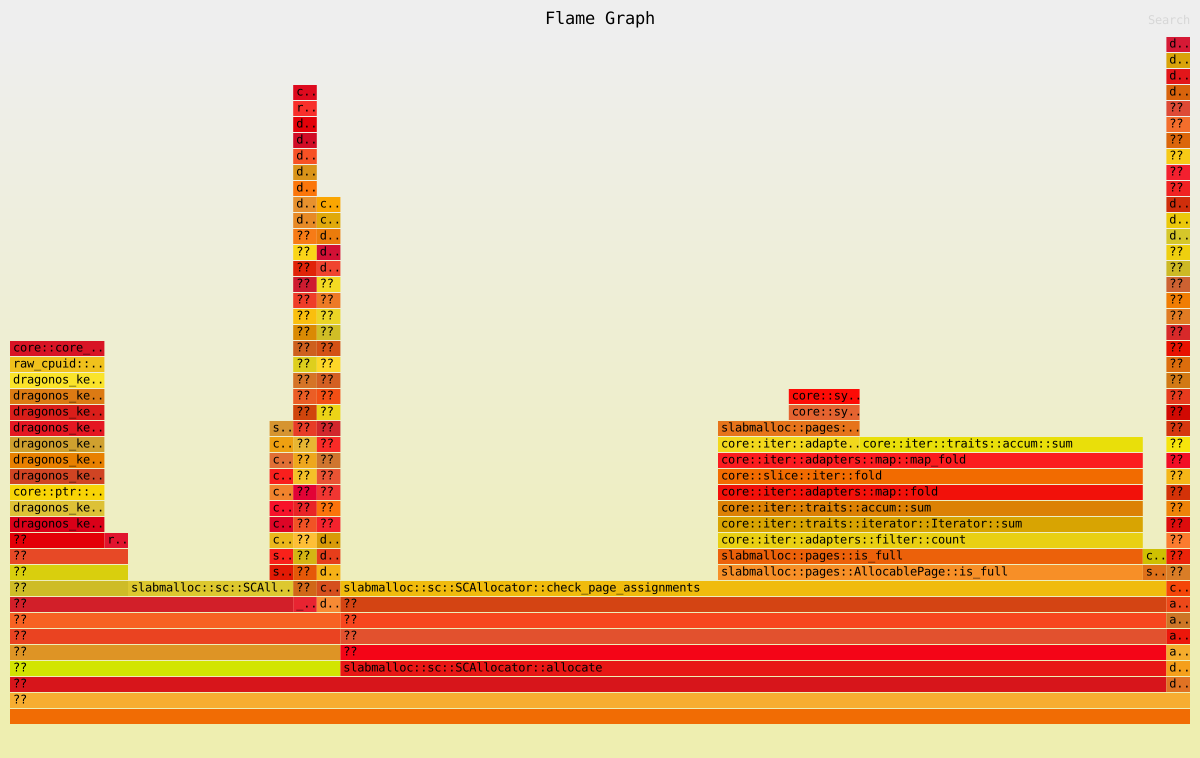
In simple terms, a flame graph is an SVG image generated from performance sampling results, used to display the call stack of the CPU.
|
||
|
|
|
||
|
|
|
||
|
|
|
||
|
|
The x-axis represents the number of samples. If a function occupies a wider width on the x-axis, it means it was sampled more frequently, indicating longer execution time. Note that the x-axis does not represent time, but rather all call stacks are merged and sorted alphabetically.
|
||
|
|
|
||
|
|
A flame graph is used to identify which function at the top level occupies the largest width. If there is a "plateau" (flat area), it indicates that the function may have performance issues.
|
||
|
|
|
||
|
|
Colors have no special meaning, as flame graphs represent the CPU's busy level, so warm tones are generally chosen.
|
||
|
|
|
||
|
|
## 2. Configuring the DragonOS Kernel
|
||
|
|
|
||
|
|
Since performance analysis requires detailed symbol table data, we need to configure the kernel compilation as follows:
|
||
|
|
|
||
|
|
In `kernel/Cargo.toml`'s `[profile.release]` section, set the following two options:
|
||
|
|
|
||
|
|
```toml
|
||
|
|
[profile.release]
|
||
|
|
debug = true
|
||
|
|
opt-level = 1
|
||
|
|
```
|
||
|
|
|
||
|
|
This will ensure that the compiled kernel includes symbol table data, making it easier for us to perform performance analysis.
|
||
|
|
|
||
|
|
## 3. Using DADK for Performance Analysis
|
||
|
|
|
||
|
|
### 3.1 Booting the Kernel
|
||
|
|
|
||
|
|
First, we need to boot the DragonOS kernel.
|
||
|
|
|
||
|
|
```shell
|
||
|
|
# 使用你喜欢的方式启动内核,例如:
|
||
|
|
make run
|
||
|
|
# 或者
|
||
|
|
make build && make qemu-nographic
|
||
|
|
```
|
||
|
|
|
||
|
|
### 3.2 Running Your Workload
|
||
|
|
|
||
|
|
After booting the kernel, we need to run some workloads in order to perform performance analysis.
|
||
|
|
|
||
|
|
This can be an application or something else. Even you can choose to do nothing and simply observe the call stack of the DragonOS kernel when it is idle.
|
||
|
|
|
||
|
|
### 3.3 Starting DADK for Performance Analysis
|
||
|
|
|
||
|
|
In the DragonOS project directory, run the following command:
|
||
|
|
|
||
|
|
```shell
|
||
|
|
dadk profile sample --format flamegraph --output flame.svg --interval 200ms --duration 20s --cpu-mask 0x1
|
||
|
|
```
|
||
|
|
|
||
|
|
The above command will perform performance analysis on the DragonOS kernel and generate a flame graph.
|
||
|
|
|
||
|
|
Detailed explanation:
|
||
|
|
|
||
|
|
- `--format flamegraph`: Specifies the output format as a flame graph.
|
||
|
|
- `--output flame.svg`: Specifies the output filename as `flame.svg`.
|
||
|
|
- `--interval 200ms`: Specifies the sampling interval as 200ms.
|
||
|
|
- `--duration 20s`: Specifies the sampling duration as 20 seconds.
|
||
|
|
- `--cpu-mask 0x1`: Specifies the CPU to be sampled as CPU 0. (This is a bitmask, meaning if you want to sample CPU 0 and 1, the cpu-mask would be 0x3)
|
||
|
|
|
||
|
|
*For more parameters, please refer to `dadk profile sample --help`.*
|
||
|
|
|
||
|
|
::: {note}
|
||
|
|
Since sampling will pause vCPU, the sampling time should not be too short, otherwise it may affect the normal operation of the system.
|
||
|
|
:::
|
||
|
|
|
||
|
|
After waiting for a while, you will get a `flame.svg` file.
|
||
|
|
|
||
|
|
### 3.4 Analyzing the Flame Graph
|
||
|
|
|
||
|
|
Open the `flame.svg` file in a browser, and you will see a flame graph.
|
||
|
|
|
||
|
|
You can click on a function in the flame graph to view its call stack.
|
||
|
|
|
||
|
|
**You can right-click the image below and open it in a new tab to experience the interactive effects.**
|
||
|
|
|
||
|
|

|